
Showing posts with label Internet. Show all posts

Wednesday, May 21, 2014

How to detect Shell when a hacker include in database

Find shell code in database php vbb

There are many of you asked me how to detect Shell when a hacker included in the database? Today I made ​​this guide to answer questions and help you aware more privacy issues.

First we must know how the hacker include in Data then we can find method to thoroughly remove. You should refer articles about menthod include in source VBB and menthod to prevent. I would say more in the vbb, tables can be used to include shell such as: table_plugin and table_template. So how to detect shell when the include in those tables. Do the following:

You go to Phpadmin of host and search keywork "base64" and do by below guide.
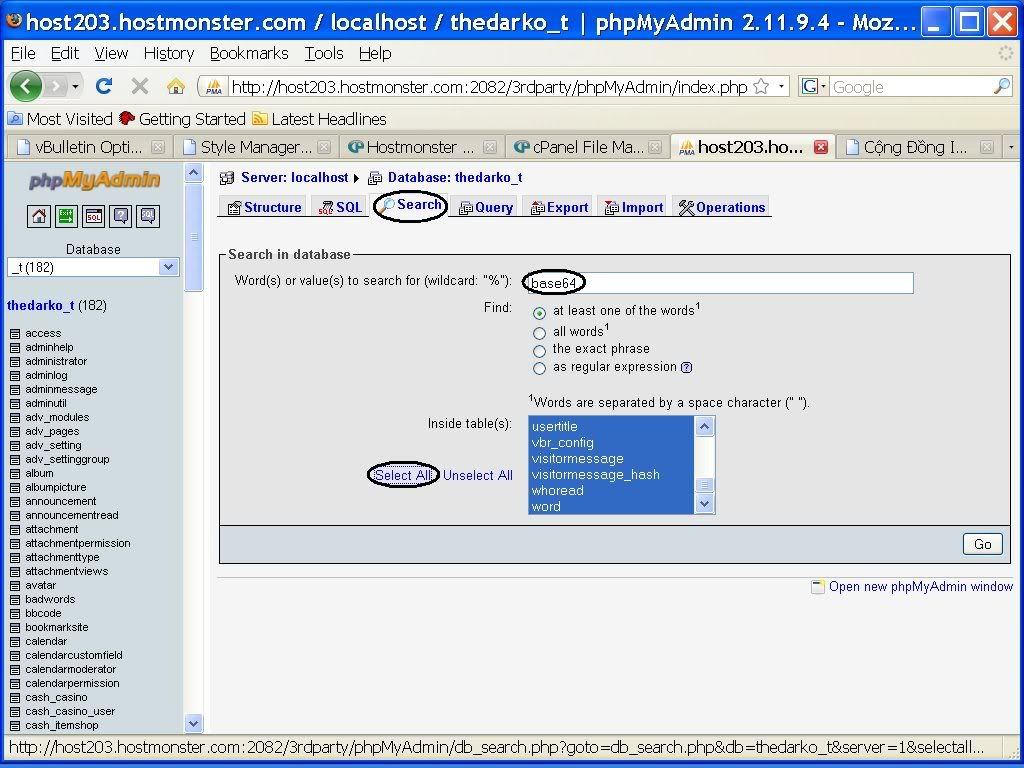
Phpadmin of host and search keywork "base64"

Why must I search tag base64 is not that other keywords ?
Because of all current Shell if it is not encrypted, it will be destroy by antivirus. Unless that files are changed to file.txt. Work remaining of you are opening the table suspiciously and check what unusual is in that.
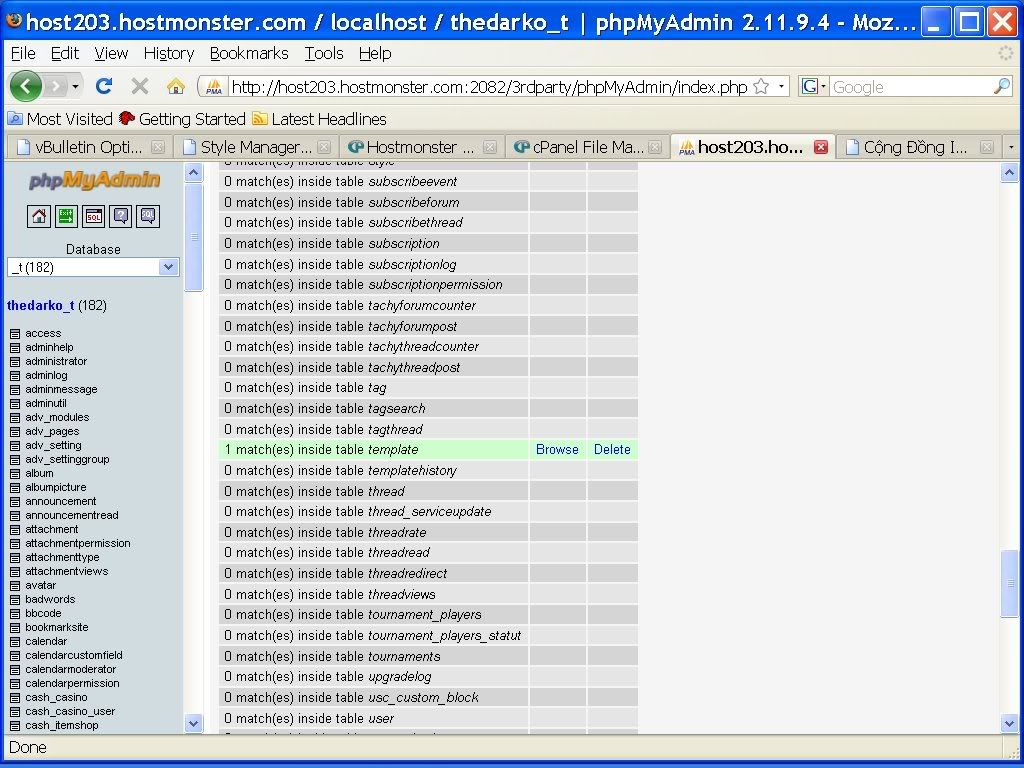
Note:
- For table plugin, you can delete without affect the operation site.
- For table template if you want, you can delete and if you want to reuse this skin, you go to admincp then click revert to vbb automatically edit skin for you.
- You can apply this method to the code such as joomla, new, shop, etc.

Translate from Tuewru's post <ceh.vn>

Tuesday, May 20, 2014

PHP paging algorithm - Dynamic web programming

PHP mysql database retrieve table to paging dynamic web

Condition before reading the article:
You must know how to connect to the DB.
• You have created a table and the table contains informations to wait ... paging
You create a file list.php has a complete code as follows:
<?php  $page = isset ( $_GET["page"] ) ? intval ( $_GET["page"] ) : 1; 
$rows_per_page = 20; 
$page_start = ( $page - 1 ) * $rows_per_page; 
$page_end = $page * $rows_per_page; 
$sql_query = mysql_query("SELECT * FROM table_name"); 
$number_of_page = ceil ( mysql_num_rows( $sql_query ) / $rows_per_page ); 
if ( $number_of_page > 1 ) 
{ 
$list_page = " <td> Page: </td>"; 
for ( $i = 1; $i <= $number_of_page; $i++ ) 
{ 
if ( $i == $page ) 
{ 
$list_page .= " <td>[ <b>{$i}</b> ]</td> "; 
} 
else 
{ 
$list_page .= "<td><a href=’list.php?page={$i}’> {$i} </a></td>"; 
} 
} 
} 
$i = 0; 
while ( $result = mysql_fetch_array ( $sql_query ) ) 
{ 
if ( $i >= $page_start ) 
{ 
print ""; 
} 
$i++; 
if ($i >= $page_end) 
{ 
break; 
}
} 
print <<<EOF 
<table cellspacing="0" cellpadding="0" border="0"> 
<tr> 
{$list_page} 
</tr> 
</table> 
EOF;
?> 
Explain each paragraph:

• The syntax of this passage is:
Page = check variable page exists or not [?]
If exists, get the value of this variable and use the function filter intval to receive safe values [:]
If not then will have the default value is 1:
 $page=isset($_GET["page"])?intval($_GET["page"]):1;
• Numbers of line on a page:
$rows_per_page = 20;
• Count the number of lines in the opening page based on variable $page:
$page_start=($page-1)*$rows_per_page;
• Count the number of lines in the last page based on variable $page:
$page_end=$page*$rows_per_page;
Example of the opening page and last page according to the above formula:
Suppose the page being viewed is 1, we are 
$page_start=(1-1)*20=0
And 
$page_start = (1 - 1) * 20 = 0 
So we have a value 0 is begin and 20 is end.
Retrieve into table_name: 
$sql_query = mysql_query("SELECT * FROM table_name");
• Count the numbers of page, do by following:
mysql_num_rows($sql_query);
is the table's total number of lines have retrieved [1]
$rows_per_page
is equal to 20 ( above value that we have set) [2]
Getting [1] divided by [2] It will be several pages
To rounding values ​​from (x.1 -> x.9 of 1 + x) we use the function ceil ()
$number_of_page=ceil( mysql_num_rows( $sql_query )/$rows_per_page); 
If the page number is greater than 1 then it will list the pages
if ( $number_of_page > 1 ) 
{ 
$list_page = "<td> Page: </td>";  
for ( $i = 1; $i <= $number_of_page; $i++ ) 
{ 
if ( $i == $page ) 
{ 
$list_page .= "<td> [ <b> {$i} </b>] </td>"; 
} 
else 
{ 
$list_page .= "<td><a href=’list.php?page={$i}’> {$i} </a></td>";  
} 
} 
}  
• Set variable $i equal zero.
$i = 0;
• List all lines in a table.
while ( $result = mysql_fetch_array ( $sql_query ) ) 
{if ( $i >= $page_start ) 
{ 
print $result[content];  
} $i++; 
if ($i >= $page_end) 
{ 
break; 
} 
}
• Above we loaded content to variable $list _ page, now we print it.
print <<<EOF 
<table cellspacing="0" cellpadding="0" border="0"> 
<tr> 
{$list_page} 
</tr> 
</table> 
EOF
Translate from Admin's post <sinhvienit.net>

Thursday, May 15, 2014

Learn what applications to slow down your internet connection by using TCPview software


• Sometimes you may detect that your internet connection is being used in the background, and don’t know what application is using it. I will show you how to supervise and manage the internet connection.
• For this, you need to download the program TCPView, a software absolutely free. Download at ►Here◄ .
The program doesn’t require installation .You only need unzip it to folder and run file Tcpview.exe .
Some minor adjustments:
• In the View menu, select Update Speed and set  one second to refresh the list per a second.
Using TCPview software, monitor display to adjust your internet slow down

In the Options menu:

• Resolve Addresses:  Allow you see the name of the remote host to which you are connecting  is not its IP.
Show Unconnected Endpoints: also showed active connections. Because we are focusing on the connections that actually use the bandwidth. you should deselect this option.
• The window Always On Top allows TCPView always above others.
• Font allows you to change the font of your application.

How to use it:
When you right click on a connection.

 • Close connection: close connection is selected, and processes depend on them. If you see an unknow using  application and misuse of your connection, this option will be disconnected immediately. (However note it may reconnect immediately, or later).

• End Process:  it closes  the program’s connect , instead of just disconnecting it as happening in the previous option.
Process Proprieties shows the location of the program on your hard drive by using the connection.

Color:
• The connection have been created only show by green
• The connection that changed the server or gateway is show by yellow
• The connection is closed is shown by red.

List of connection  being using your network and make slow down internet


To find the culprit:


• From the list of processes, click Rcvd Bytes to sort it in descending order. This column represents the number of bytes of the corresponding process has been downloaded. The column Sent Bytes and Packets Rcvd column will also help you identify the culprit of your applications. To reject an application from the continued use of your internet connection, right-click on the specific process and choose End Process.


List of process with PID protocol packet byte send and receive

• You can also use TCPView to hunt down unwanted programs, malware, spyware by analyzing processes and corresponding bytes are converted.
Translate from thangcohut's post  <vn-zoom.com>


Copyright @ 2014 Guide and share anything relate to Information Technology.

Template by Templateism | MyBloggerLab